Error When Connecting to Azure Data Lake Storage Gen2 using Power BI : Unable to Connect: Access to the resource is forbidden

Connecting to Data Lake Store via Power BI is become a norm. However though the steps are few, which is really not straight forward as you might need to do some sort of tweaks in order to getting to the data.


Recently came across some issue while trying to connect to the Azure Data Lake Gen 2 using Power BI. I used the URL which you can retrieve from Azure Portal or Microsoft Azure Storage Explorer > Properties. I'm not going to explain it the steps in details as it is pretty straight forward and there are many articles on how to do it. 

Retrieve the URL from Azure Storage Explorer properties

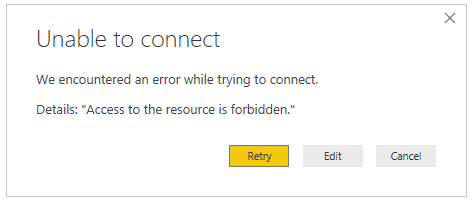
However when I click the OK button to connect, surprisingly I got the error message mentioned in below. 
Unable to Connect: Access to the resource is forbidden.

Error Message

Confusion here is I've logged in using the same account which I used to create the resource. My account has "Owner" role been assigned.

Solution 

The AD user you used in Power BI to connect to the Azure Data Lake, Storage Blog Data Reader permission has to be given, in order to read the data in ADL.


This approach worked very well to sort this problem I mentioned above. 

Comments

  1. Nice blog.
    The way you explained about the setting of Http with Nginx on azure is brilliant.
    The way you described the details in the blog is very easy to understand and is very important too.
    I was looking for azure develops company for my software development related requirement and got your blog.
    Thanks for sharing such a great blog.
    Hire Dedicated Website Development Company

    ReplyDelete
  2. very nice and provide me informative content thanks for sharing for more information Looking for the best Importance of business intelligence

    ReplyDelete
  3. Thank you so much, been struggling with this problem for day and you really help me.

    Thank you for sharing

    ReplyDelete
  4. Thanks for sharing such beautiful info , i think u will also share such type of info ,
    i am very happy to that your way of consideration is very much good , i liked it ,
    can u share again such type of info??? ... " Self Storage "also one of the out standing SELF storage Copany in Uk ,
    Cheapness with best quality is the reason are that every person most prefer to get their services ...
    For more detail click here

    ReplyDelete
  5. I think there is a need to provide some more information and explore more resources of Power BI as well.

    Powerbi Read Rest

    ReplyDelete

Post a Comment

Popular posts from this blog

Run T-SQL Script Files Using Command Line

Most of the time when we need to execute a SQL script or statement, then we go for SQL Server Management Studio to execute our T-SQL scripts. But the same result we can achieve using Command Prompt. This is very simple way to do that just a matter of write a command and pass few arguments. You can see the process status like as in when you execute a query in Management studio. Use-case : There may be having some situations you won't be able to execute T-SQL script using Management Studio. Most of the time when doing data population. In my case, I had a situation I needed to populate a Database without using backup/restore. Once I generated script with all the schemas and related data it took around 400+Mb sql file.  SQL Server Management Studio will not allow you to run the script unless you execute the query in high-end box. Because, when the file loaded to the memory it will too hard to cater our requirement. You may probably get  memory ...

How to Create a Date Table in Few Steps Using Power BI

Calendar Dimension or Calendar Table is one of the crucial table in a Power BI model. I never have seen any data warehouse data model which does not have a Calendar table so far in my development. Because, when it comes to data warehousing or dimension modeling you may storing various business processes or events as Facts. So those events anyway occur in particular date or time. So simply there wouldn’t be a Power BI data model without a date table. In this post, I’m going to share with you how to create a date table within few steps. Actually, there are two DAX measures which we can use to create a date table. Calendar(DAX) and CalendarAuto(Auto). Calendar(DAX) = You can pass start date and End date as parameters you need to create date table. CalendarAuto(DAX) = You can use this function without passing any parameter. Then it will generate the dates based on your data model dates.  You can simply copy the below DAX code and paste in your Power BI Desktop DAX e...

How to Visualize Images Dynamically using Microsoft Power BI

One of the challenging part of the Power BI report development is handling dynamic images. We can add a static image within few steps and it is pretty straightforward. But, when it comes to dynamic images, available options are countable. Available options: Upload to the Web : You can upload the images to the web and use the image URLs as a reference. But, you need to make sure the data category  of your column where to store the image URL make it as  I mage URL. When we are dealing with clients data we cannot upload it to the public web. So, need to be accountable for data we are dealing with. Azure Blob Storage : If the security is the concern, you can use Azure blog storage to store image files. Only accessible who are in the same domain or security group. You have the full control over managing the authorization. I have an experience of, there are clients they never want to upload any data to the cloud. And if we are dealing with multiple clie...